
Desktop app — closed beta
The shared mind of
the world's DJs.
Intelligence built from sets played to real rooms.
Mastermind knows your library better than you do. It also knows what thousands of other DJs did with the same records, pooled from sets played to real rooms. When it hands you a track you'd never have found, nobody's guessing: someone played it, in a room, right next to something you own. And it can tell you which artists genuinely mix with your library, because other DJs already have.
The desktop app is built with love, by DJs, for DJs. The tools we always wanted, in one place. It takes the hours of prep between finding a track and playing it and does them for you: key and BPM nailed, auto hot cues sitting on the phrases, waveforms and the whole interface customised to suit your style. It finds duplicates and intelligently manages your library, plus plenty more. Then it writes the lot back to rekordbox, Serato, Traktor, or straight onto a stick the CDJs read.
You turn up and play. Informed.
Desktop is the one that works on the files already on your drive: your library lives on your machine, and a compressed copy of each track goes out for analysis. It's an invite-only closed beta for now, and the web app is free and the same library: start there tonight and it'll be waiting when you open desktop.
The desktop app is in closed beta. Sign in to redeem an invite code, or tell us a bit about how you DJ and we'll be in touch.
Prefer email? hello@mastermindmusic.net.
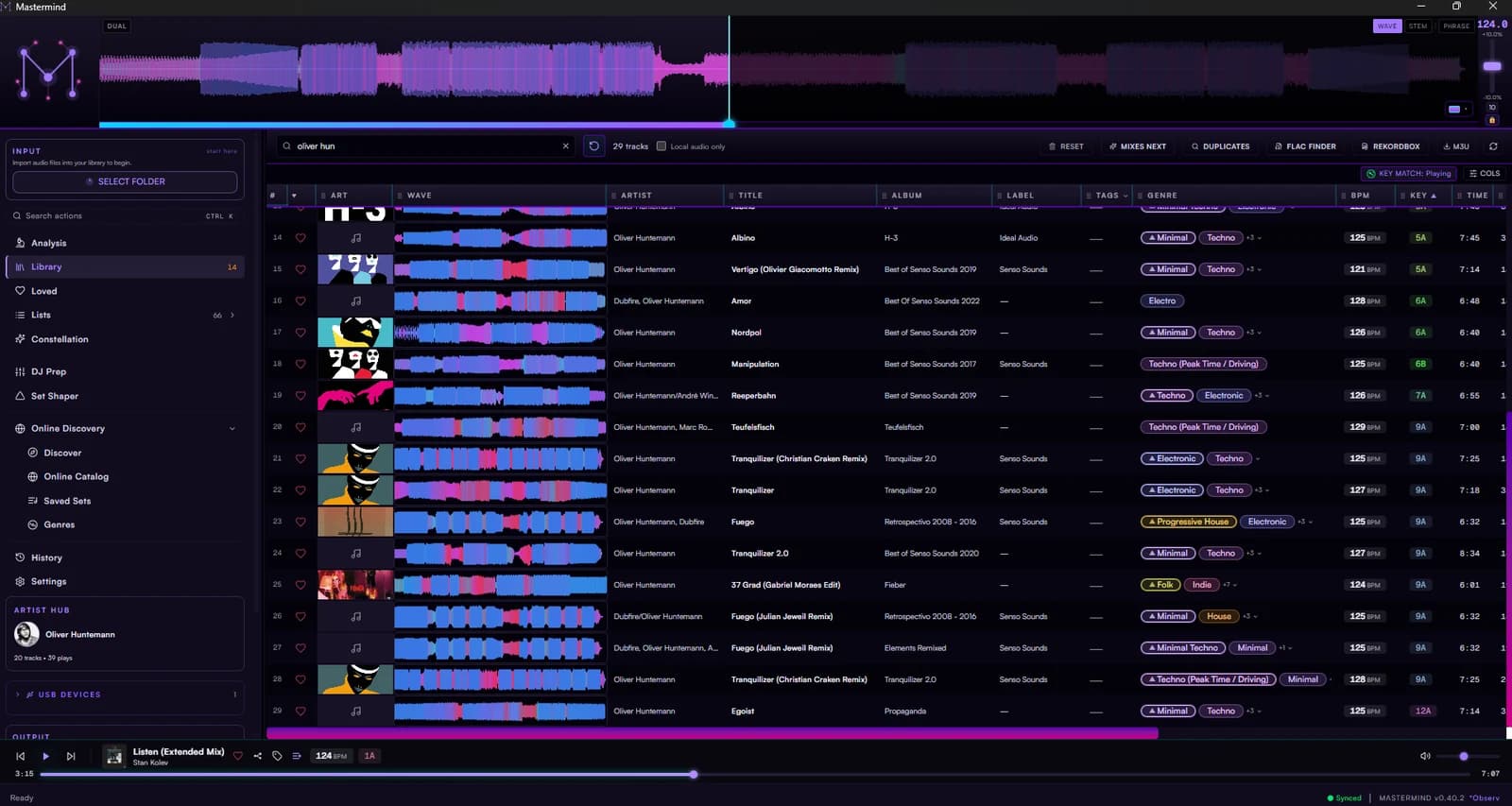
Everything between finding a track and playing it.
The web app handles your library. This handles the hours after it, the ones you never really wanted to spend.
See it before you hear it
Bass, mids and highs each get their own colour, so a breakdown looks like a breakdown from across the room. Flip to stems and the vocal sits on its own layer, which helps when you're hunting for the bit you want to loop.
The drop, already under your finger
Analysis reads the phrasing and fills all eight hot cues, so the parts you actually reach for are waiting. The grid holds on live recordings and old vinyl rips, which is where grids usually give up and leave you nudging by hand.
See the stems in the waveform
Bass, drums and vocals get their own layer, worked out on your own machine — no queue. Pulling a real acapella out is a heavier job and goes out for separation.
Your tags, finally sorted
Genre, label, year and proper artwork filled in for you. Twelve years of inconsistent filenames tidied into one shape. Change your mind and you can put it all back, because nothing here is one-way.
It comes to the gig with you
rekordbox XML, Serato tags, Traktor NML, or a USB stick the CDJs read without being asked twice. Cues and grids make the trip, so the set you built at home is the set you walk in with.
Know who you're playing
A mix-compatibility score against your own library on every artist — key, tempo, shared labels — plus whose sets they belong next to. Found a gap? Buy it on Beatport or Bandcamp, where the money actually reaches them.
Walk in, plug in, play.
Everything you did at the kitchen table comes with you. Cues and grids to all three, colours to rekordbox and Serato, playlists to rekordbox, Traktor or the stick. Hand it over, or walk to the booth with it. No setting up in front of a full room, and no nasty surprises at one in the morning.
- Cues and grids carry over
- Cue colours in rekordbox and Serato
- Playlists into rekordbox, Traktor and USB
- Same set at home and in the booth
Where it goes
- rekordboxXML collection — cues, grids, colours and playlists.
- SeratoCue markers written into the files themselves, so Serato just reads them.
- TraktorNML collection, cue points and all.
- USB stickWritten the way CDJs expect, so you plug in and the tracks are there.
Start tonight.
The web app is free, and it's the same library. Build it there now and it's already yours the first time you open desktop. Request access — or email hello@mastermindmusic.net — and we'll let you know when your invite is ready.